
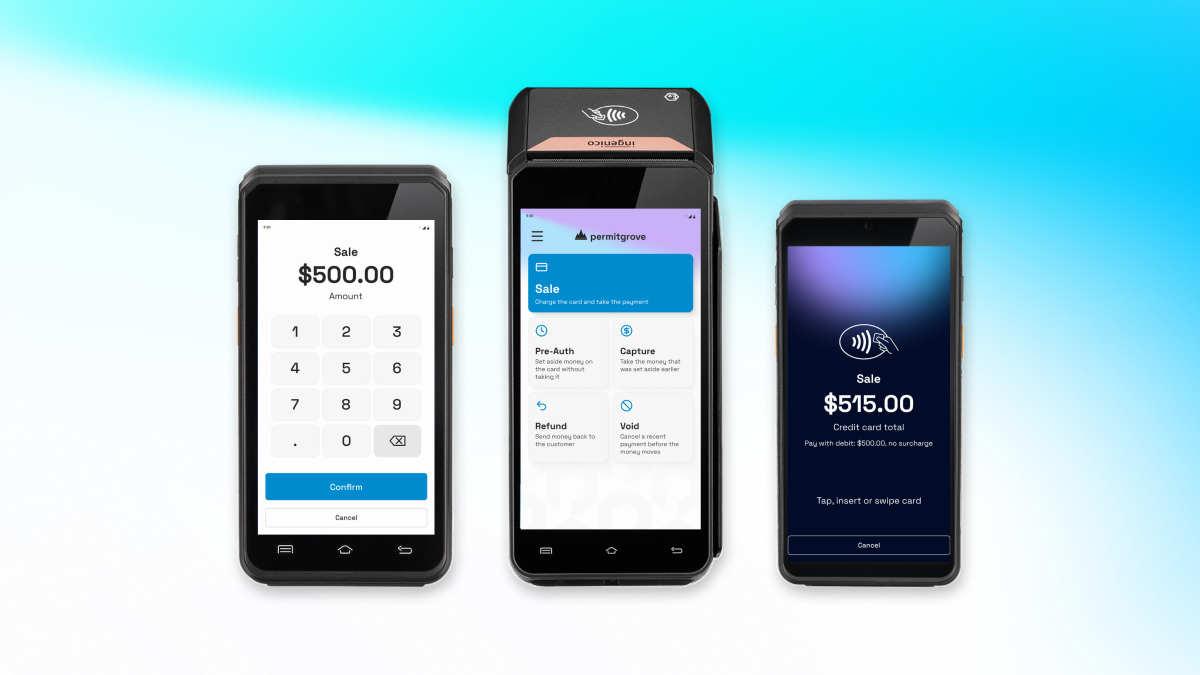
Payabli now supports Ingenico AXIUM smart terminals, integrated payment terminals that take the amount from your software and send the result straight back to it. Your platform sends the amount through the Pay In API, the customer taps or inserts a card, and a webhook returns the result for your software to match to the right record or work order.
In-person payments haven’t gone away. Even in retail, Census Bureau data puts e-commerce at just 17.1% of US retail sales in Q2 2026. Clinics, leasing offices, and field crews take payments at a counter or on a job site every day.
This launch adds three Android handhelds to Payabli: the DX8000, EX8000, and EX6000. Your software can drive them directly, or merchants can run them on their own, and every payment taken on them lands in the same Payabli reports and deposits as your online payments.
Key takeaways
- Integrated payment terminals take each amount from the merchant’s software and report each result back to it, which removes re-keying of amounts and manual reconciliation. Ingenico AXIUM terminals on Payabli work this way through the Pay In API.
- Pick by printer, battery, and size. The DX8000 prints receipts, the EX8000 lasts a full shift in the field, and the EX6000 is the smallest option for quick, occasional payments.
- Card data stays off your systems. Each terminal encrypts it at capture with P2PE, and your software only ever handles the amount, the result, and a masked card number.
- Rolling out devices doesn’t take a hardware team. Merchants activate each branded terminal with a one-time code from your platform, and your team tracks every device’s status from the Payabli Portal.
What does a disconnected terminal cost your merchants and your platform?
A disconnected terminal is a card reader your software can’t talk to. Staff read each total off your screen, key it into the terminal by hand, and the payment never flows back to the invoice or visit it belongs to.
- Re-keyed amounts: Say a front-desk employee reads a $158 balance off one screen and types $185 into the terminal. Nobody notices until close, and the fix is a refund, a new charge, and an awkward call with the customer.
- Orphaned payments: The charge isn’t tied to the record or visit. Someone matches deposits to records by hand, often days later.
- Support tickets that land on you: When the numbers don’t add up, merchants don’t call the processor. They call their software provider.
- Volume outside your platform: A terminal from a separate processor puts card-present volume where your reporting can’t see it, and your platform misses the transaction revenue on it.
How do integrated payment terminals work on Payabli?
In Semi-Integrated mode, your software drives every payment, and the AXIUM terminal only collects the card.
1. Your software sends the amount: When a patient checks out or a crew closes a job, your platform sends the transaction to the Pay In API in a single REST call, with no SDK to install.
2. The customer pays on the device: They tap a card or phone, insert a chip card, or swipe.
3. The result comes back to your system: The request returns an Initiated status right away. Once the card is read, Payabli sends an ApprovedPayment or DeclinedPayment webhook, and your software matches the payment to the invoice, visit, or order.
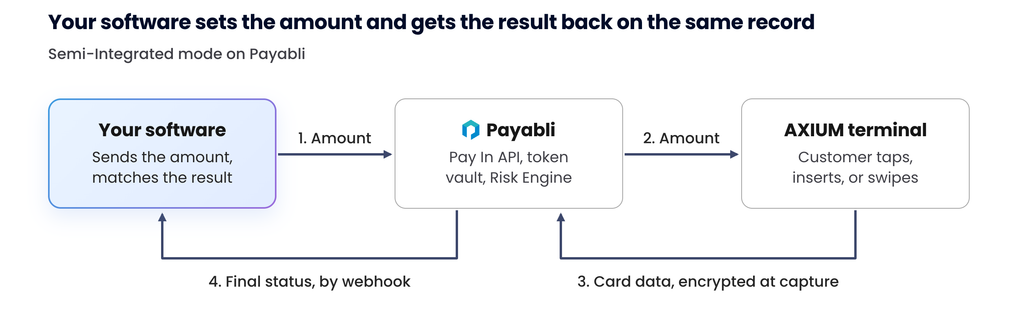
Figure 1. How a Semi-Integrated payment moves between your software, Payabli, and the AXIUM terminal.
Semi-Integrated mode covers the full transaction lifecycle, including sale, auth and capture, void, refund, and partial refund. Set one flag on the sale, and the card is tokenized into the Payabli vault. You can charge it again later, or put it on a payment plan, without the customer present. The Payabli developer docs outline the request and webhook formats.
What makes AXIUM terminals semi-integrated?
“Integrated payment terminal” covers any terminal connected to a merchant’s software. AXIUM terminals on Payabli are the semi-integrated kind. Your software and the terminal share the amount and the result, but card data travels from the terminal to Payabli without passing through your software. A fully integrated setup, by contrast, runs card data through the application itself. Payabli’s devices overview notes that P2PE devices like these can help reduce the cost and scope of PCI DSS compliance.
Which mode should your merchants start in?
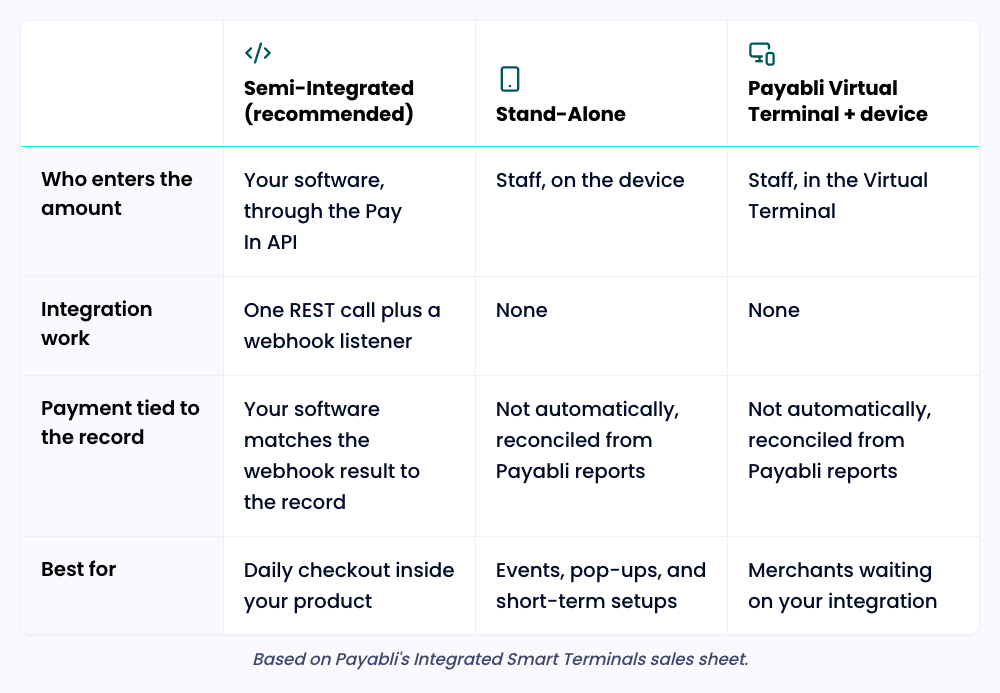
Merchants can start in Stand-Alone mode or take device payments from the Payabli Virtual Terminal, then switch to Semi-Integrated later without changing processors.
Table 1. Semi-Integrated, Stand-Alone, and Virtual Terminal options compared
What’s in the Ingenico AXIUM lineup?
The three handhelds differ mainly in the printer, the battery, and the size. Where a merchant collects decides which one fits.
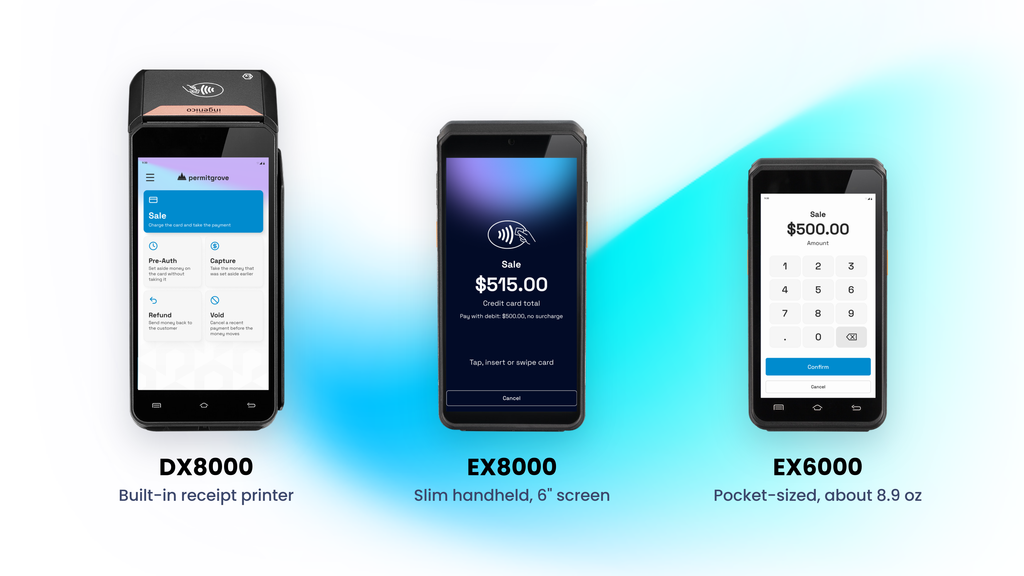
Figure 2. The Ingenico AXIUM DX8000, EX8000, and EX6000 handhelds on Payabli. Device images from Payabli’s AXIUM product collateral.
Table 2. Ingenico AXIUM DX8000 vs. EX8000 vs. EX6000
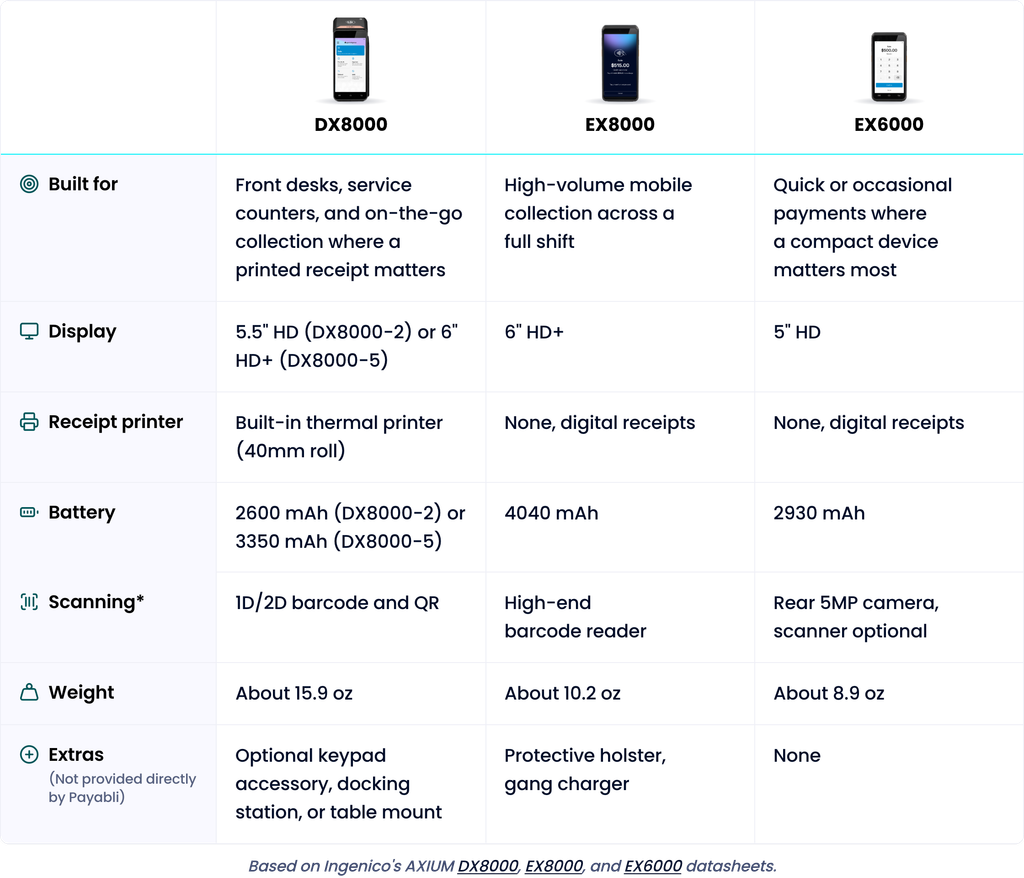
Based on Ingenico’s AXIUM DX8000, EX8000, and EX6000 datasheets.
*Barcode and QR code scanning is a device capability, not a Payabli feature. Payabli handles payment processing only. Platforms who want to use the scanner or other non-payment device features need to build and support them in their own software.
All three devices run Android 10, connect over 4G and Wi-Fi, carry PCI PTS v6 certification, and operate from 14°F to 122°F. They accept EMV chip, magstripe, and contactless cards and digital wallets. Tap to pay accounted for nearly 70% of Visa’s US face-to-face transactions in fiscal Q1 2026 (Oct to Dec 2025), according to Visa. Staff get a full-color touchscreen with the tap-and-swipe navigation of a modern phone instead of button menus.
Which AXIUM device fits each vertical?
One AXIUM integration works on all three devices. Adding a vertical or a second device doesn’t mean writing new payments code.
Table 3. AXIUM device recommendations by vertical
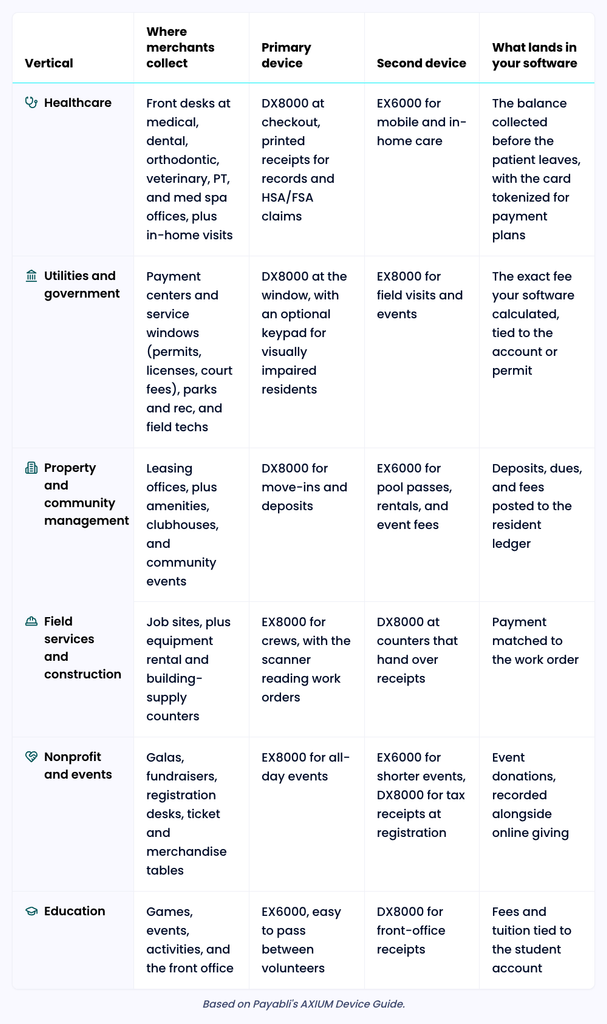
Based on Payabli’s AXIUM Device Guide.
How do platforms deploy and manage AXIUM devices?
Rolling out terminals to dozens of merchants shouldn’t turn your team into a hardware help desk.
Each device ships pre-loaded with your platform’s colors and logo. Your platform generates a one-time activation code, a 6-digit code that expires after five minutes. On the device, staff join Wi-Fi, open the Payabli app, name the device, and enter the code.
From the Payabli Portal, your team names and monitors devices and sees whether it’s online, offline, or busy. The Portal and the API also show each device’s last check-in, which helps you spot a terminal that has gone quiet before the merchant calls. Firmware updates install outside business hours.
Device payments land in the same Pay Ops reporting as online payments. Reports break them out by device and entry mode, showing tap, chip, and swipe volume for each merchant.
How are AXIUM payments secured?
Every AXIUM device on Payabli captures and encrypts card data at the terminal with point-to-point encryption (P2PE). Devices stay locked until they’re registered, card-present risk rules run in Payabli’s Risk Engine, and Payabli is a PCI DSS Level 1 certified service provider. See Payabli security for details.
How do you bring AXIUM terminals into your platform?
Follow these four steps to roll out AXIUM. Merchants can start taking payments after step 2, before your integration is built.
1. Choose devices by merchant segment: Use Table 3 to pick a device for each merchant segment.
2. Get urgent merchants live now: Stand-Alone mode needs no integration, and activated devices also appear as a payment method in the Payabli Virtual Terminal.
3. Build the Semi-Integrated flow: The AXIUM devices API quickstart covers the amount request and result webhook from Figure 1.
4. Order devices and set pricing: Order AXIUM terminals from Payabli, and Payabli’s team configures your paypoints for Semi-Integrated processing. Then use pricing templates to set merchant rates by vertical. Card-present volume then earns your platform revenue the same way online payments do.
Book a demo to see an AXIUM payment land on a record in your software.
Disclaimer: Device specifications come from Ingenico product datasheets supplied by Payabli and may change. Market data comes from the sources listed below, checked October 23, 2026.
Frequently asked questions
1. Can a platform activate several AXIUM terminals at once?
Yes. A paypoint can have several activation codes live at the same time, so a team can register a batch of terminals in one pass. Each code binds to whichever device enters it first and expires five minutes after it’s issued, so generate the codes once the terminals reach the activation screen.
2. Can a platform see every AXIUM device across its merchants?
Yes. Payabli’s API can list the devices across an organization in one request, covering all of its paypoints. Each record shows which merchant the device belongs to, its status and last check-in, and its transaction count and volume processed.
3. Which network domains does a merchant’s IT team need to allow for AXIUM terminals?
AXIUM terminals pull firmware and configuration updates from Ingenico’s hosted estate manager, so a merchant’s IT team needs to allow its production URL if the network restricts outbound traffic. Payabli’s AXIUM device docs list the exact URL to allowlist, plus a separate one for pre-production testing. If the network blocks it, the terminal can’t receive updates.
Sources
1. Federal Reserve Bank of St. Louis (FRED), E-Commerce Retail Sales as a Percent of Total Sales, Q2 2026 observation from Census Bureau data: https://fred.stlouisfed.org/graph/?g=Bebu
2. Payabli, Pay In: https://payabli.com/pay-in/
3. Payabli Docs, Webhooks quickstart: https://docs.payabli.com/guides/pay-ops-developer-webhooks-quickstart
4. Payabli, PayFac-as-a-Service for Vertical SaaS, a complete guide: https://payabli.com/payfac-as-a-service-for-saas-a-complete-guide/
5. Payabli Docs, Devices overview: https://docs.payabli.com/guides/pay-in-devices-overview
6. Payabli Docs, Tokenization overview: https://docs.payabli.com/guides/platform-tokenization-overview
7. Ingenico, AXIUM DX8000 datasheet (February 2026): https://ingenico.com/sites/default/files/resource-document/2026-07/AXIUM-DX8000%20Datasheet_FEB26.pdf
8. Ingenico, AXIUM EX8000 datasheet (August 2023): https://ingenico.com/sites/default/files/resource-document/2023-08/DATASHEET-AXIUM-EX8000_AUG23.pdf
9. Ingenico, AXIUM EX6000 datasheet (September 2023): https://ingenico.com/sites/default/files/resource-document/2023-10/DATASHEET-AXIUM-EX6000_EN_SEP23.pdf
10. PCI Security Standards Council, PIN Transaction Security (PTS) document library: https://www.pcisecuritystandards.org/document_library?category=pts
11. Visa Inc., corrected transcript of the fiscal Q1 2026 earnings call (January 29, 2026), page 3: https://s1.q4cdn.com/050606653/files/doc_financials/2026/q1/CORRECTED-TRANSCRIPT_-Visa-Inc-V-US-Q1-2026-Earnings-Call-29-January-2026-5_00-PM-ET.pdf
12. Payabli Docs, Activate an AXIUM device: https://docs.payabli.com/guides/pay-in-portal-devices-axium-activate
13. Payabli Docs, Manage devices in the Payabli Portal: https://docs.payabli.com/guides/pay-in-portal-devices-manage
14. Payabli, Pay Ops: https://payabli.com/pay-ops/
15. Payabli Docs, API changelog, Accept card-present payments with AXIUM devices (August 21, 2026): https://docs.payabli.com/changelog/api-changelog/2026/8/21
16. Payabli Docs, Risk basics: https://docs.payabli.com/guides/platform-risk-basics-overview
17. Payabli Docs, Trust center: https://docs.payabli.com/trust-center
18. Payabli, Security: https://payabli.com/security/
19. Payabli Docs, AXIUM devices API quickstart: https://docs.payabli.com/guides/pay-in-developer-devices-axium-quickstart
20. Payabli Docs, Manage AXIUM devices: https://docs.payabli.com/guides/pay-in-developer-devices-axium-manage