
Key Takeaways
- Vendor onboarding collects four data categories: identity and tax (W-9 or W-8), banking, payment method preferences, and contact information. Each feeds specific downstream uses: tax data drives 1099s, banking drives ACH/wire, preferences drive rail routing, contact info drives the enablement team’s outreach.
- The W-9 captures legal name, DBA, entity type, address, TIN, and signature. Electronic W-9 collection is permitted, most platforms build an electronic flow. W-9 records are retained per IRS guidance (typically 4 years). Periodic refresh every 2-4 years is good practice.
- W-8 series for foreign vendors: W-8BEN (foreign individual), W-8BEN-E (foreign entity), W-8ECI (U.S.-connected), W-8IMY (intermediary). Without a certified exemption, foreign vendors face 30% FATCA withholding, and their year-end reporting runs on 1042-S rather than 1099.
- ACH requires a routing number, account number, and account type. Wire adds SWIFT/BIC and correspondent details for international. vCard needs only a delivery email. Verify at capture (micro-deposits, instant verification, penny-credit) rather than waiting for the first payment to fail.
- Per Payabli’s managed payables documentation, the waterfall is vCard first, ACH if the service fee > 1.2%, and check as a fallback. Capture the vCard service fee at onboarding for vendors who accept vCard, so routing is correct from the first payment.
Before a platform can pay a vendor, the platform has to know how to pay that vendor: who the vendor is legally, where their money goes, which rail they prefer, and who to contact when something comes up. Getting this data wrong is expensive. A missing tax ID means the platform has to backup-withhold 24 percent of the payment or refuse to pay. Wrong banking details mean ACH returns, operational work, and a frustrated vendor. Bad contact information means the enablement team cannot reach the vendor, and managed payables defaults to check (the slowest and least revenue-generating rail) by default.
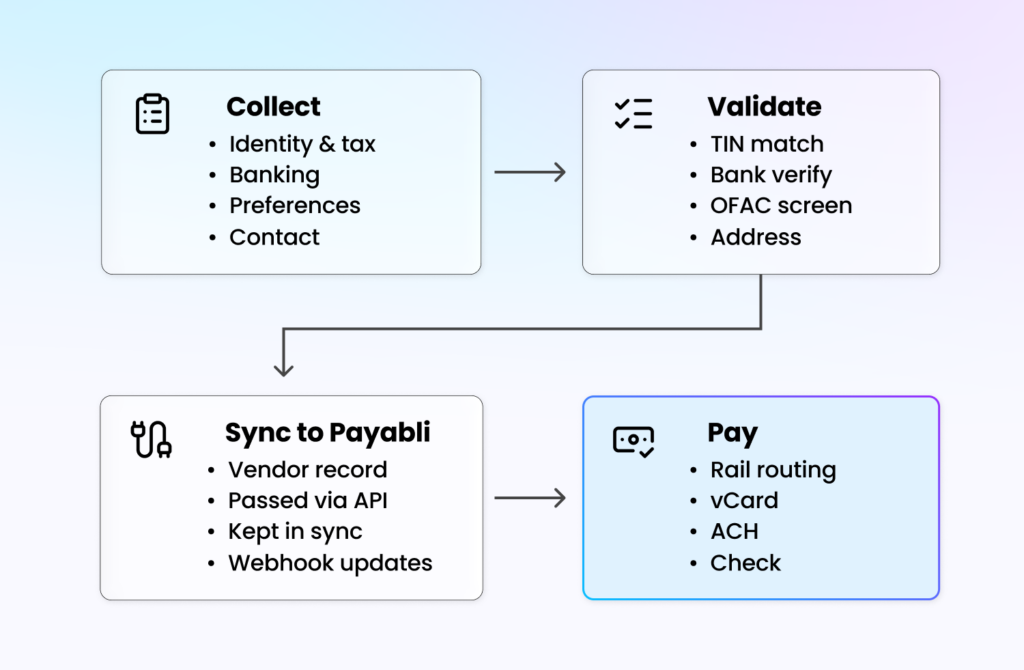
This article walks through what Pay Out vendor onboarding has to collect, the W-9 and its foreign equivalent the W-8, banking details and how they get verified, payment method preferences and the interaction with the enablement waterfall, contact information for the vendor-facing enablement team, the validation layer (TIN match, bank-account verification, OFAC, address), how the data flows from the platform into Payabli for execution, the platform’s UX for collection (and Payabli’s hosted fallback for platforms that do not want to build the UX), ongoing maintenance to keep vendor records current, and vertical-specific wrinkles in onboarding.
What vendor onboarding has to collect
The four data categories collected at vendor onboarding and what each one enables downstream. Pay Out vendor onboarding collects four categories of data, each serving a different downstream use.
-
Identity and tax
Legal name, DBA name if different, entity type (sole prop, single-member LLC, partnership, C-corp, S-corp, nonprofit, other), Taxpayer Identification Number (TIN, which is either an SSN for sole props or an EIN for businesses), U.S. address, and a signature attesting that the information is correct and that the vendor is not subject to backup withholding. For foreign vendors, the equivalent is the W-8 series with different certifications.
-
Banking
For ACH: routing number, account number, account type (checking or savings). For wire: the same plus any correspondent bank details for international. For vCard: typically just a delivery email, because the vendor processes the card through their own existing merchant acquirer.
-
Payment method preferences
Which rails the vendor accepts (vCard, ACH, check, wire, RTP), which rail they prefer, and for vCard vendors, the service fee they charge on card acceptance. This drives the managed payables enablement waterfall per Payabli’s managed payables documentation.
-
Contact information
AR contact name, phone number, and email. Optionally, a separate remit-to address distinct from the legal address. This is what the enablement team uses when they call to verify preferences within 36 business hours.
Getting all four complete and accurate is the goal of onboarding. Each missing or incorrect piece creates downstream operational work.
The W-9: what it captures
The W-9 is the IRS form that captures the information a payer needs to report year-end payments on a 1099. It is the canonical U.S. tax document for vendor onboarding.
-
The fields
The W-9 has a specific set of fields: legal name (line 1), DBA if applicable (line 2), federal tax classification (the entity type checkbox), exemptions (the vast majority of vendors have no exemptions), address, city, state, ZIP, TIN (either SSN or EIN), and a signature with date.
-
Why the form matters
The W-9 serves three purposes. First, it collects the TIN that the platform uses to issue 1099s at year-end (covered in depth in article 292). Second, it is a legal certification: the vendor affirms that the TIN is correct and that they are not subject to backup withholding. If the information turns out to be wrong or missing, IRS penalties can apply, and the platform may have to collect backup withholding on future payments. Third, it establishes a documented identity for the vendor that can be referenced in disputes, audits, and KYC reviews.
-
Electronic W-9
The W-9 does not have to be collected on paper. Electronic W-9 collection is explicitly permitted by IRS rules as long as the electronic process captures all the same fields and produces a signed record that can be retained. Most platforms build an electronic W-9 flow rather than asking vendors to download the PDF, fill it out, and upload it. The platform stores the W-9 record in its vendor master for the retention period (typically four years per IRS guidance).
-
Keeping the W-9 current
Vendors sometimes change entity type, update their legal name after an acquisition or reorganization, or move addresses. The platform’s vendor master should prompt for an updated W-9 when those changes happen. Many platforms run a periodic refresh (every 2 to 4 years) to ensure records are current even when the vendor has not proactively updated them.
W-8 for foreign vendors
Foreign vendors (non-U.S. entities receiving payments from a U.S. payer) do not file a W-9, they file one of the W-8 series forms:
-
The common W-8 forms
W-8BEN is for foreign individuals certifying their non-U.S. status and, if applicable, claiming treaty benefits. W-8BEN-E is the business equivalent for foreign entities. W-8ECI is for foreign entities whose U.S. income is connected to a U.S. trade or business. W-8IMY is for intermediaries passing payments through to underlying beneficial owners.
-
Withholding implications
Foreign vendors can be subject to 30 percent withholding on U.S.-source payments under FATCA unless they certify an exemption (tax treaty benefit, effectively connected income, or specific entity type). The platform collects the correct W-8, applies the appropriate withholding rate, and reports on the year-end 1042-S form rather than the 1099.
-
Onboarding complexity
Foreign vendor onboarding is materially more complex than domestic onboarding because of the W-8 variants, treaty analysis, and FATCA compliance. Many platforms initially only support domestic vendors and add foreign vendor support as a specific feature when their merchants need it.
Banking details by payment rail
The banking details that the platform collects depend on which rails the vendor will receive payments on.
-
ACH details
Three fields: routing number (9 digits, identifies the bank), account number (variable length, identifies the account at the bank), and account type (checking or savings). The platform may also collect the account name if it differs from the vendor name, though most ACH processing does not match on name.
-
Wire details
For domestic wires: routing number (often a Fedwire routing number, which may differ from the ACH routing number for the same bank), account number, account name. For international: SWIFT/BIC code, IBAN or local account number, bank name and address, correspondent bank if needed.
-
vCard details
Minimal: an email address where card credentials can be delivered. The vendor processes the card through their own merchant acquirer, so no further banking details are needed from the vendor’s side. Some vendors prefer a secure link delivery rather than email, the platform captures the preference.
-
Verification at capture
The platform should verify banking details at the time of capture rather than waiting for the first payment to fail. Common verification methods: micro-deposits (sending two small deposits that the vendor confirms), instant account verification via Plaid or equivalent (authenticated login against the vendor’s bank), or a penny-credit verification (sending a single credit and having the vendor confirm the amount). Each has its own cost and friction profile.
Payment method preferences
The payment method preference drives the enablement waterfall and the rail routing for every subsequent payment.
-
What the vendor is asked
Two questions. First, which methods do you accept (vCard, ACH, check, wire, RTP)? Second, what is your preferred method? The platform may also ask about specific preferences: vCard only if the amount is above a threshold, ACH for routine payments, wire for urgent, and so on.
-
The vCard service fee
For vendors who accept vCard, the platform captures the service fee they charge their own merchant processor. This matters because per Payabli’s managed payables documentation, the enablement waterfall suggests ACH instead of vCard when the service fee exceeds 1.2 percent. A vendor’s comfort with vCard depends on the cost of accepting it.
-
Preference drift over time
Preferences change. A vendor that accepted vCard six months ago might change merchant processors and now see a higher service fee, pushing them to ACH. Onboarding captures the initial preference, managed payables re-verifies periodically (and especially after payment failures) to keep preferences current.
-
Default fallback
When the platform has not collected explicit preferences, the managed payables enablement waterfall takes over, applying the same service-fee logic described above to route each payment. The vendor’s initial preference is an input to the waterfall.
Contact information for enablement
The enablement team needs to reach the vendor to verify preferences, work through exceptions, and re-verify when preferences drift.
-
What to collect
AR contact name (so the team knows who to ask for), phone number (the primary contact mechanism for the enablement call), email (for written follow-ups and vCard delivery), and optionally a department or role.
-
Why AR contact matters
Calling a vendor’s main line and asking for “whoever handles payments” is a high-friction conversation. Calling and asking for the AR contact by name (or at least by role) reaches the right person faster and reduces the friction on both ends. This drives both vendor satisfaction and enablement conversion rates.
-
Remit-to vs. legal address
Legal address (from the W-9) and remit-to address (where checks are actually sent) can differ. A business might have its legal address at one location but receive mail at a different payment processing center or lockbox. The platform collects both and uses the remit-to for actual check mailing.
Validation and verification
The data the vendor provides has to be validated before it is usable. Several layers of validation apply.
-
TIN match
The IRS provides a TIN matching service that checks whether a submitted name and TIN match IRS records. Platforms should submit the W-9 data through TIN match to catch typos and fraud. Mismatches can trigger backup withholding (24 percent on future payments) until resolved.
-
Bank account verification
As covered above, micro-deposits, instant verification, or penny-credit verification. The cost and friction vary, the platform picks the method that fits its vendor experience. Unverified bank accounts should not be used for payment until verification is complete.
-
OFAC screening
Per OFAC rules, U.S. entities cannot pay parties on the Specially Designated Nationals (SDN) list or in sanctioned countries. The platform screens the vendor name and address against the SDN list at onboarding and periodically thereafter. Hits are rare but have to be handled carefully.
-
Address validation
USPS and commercial address validation services check that the address is deliverable. This matters for check mailing (undeliverable checks are expensive) and for tax form mailing at year-end.
-
Duplicate vendor detection
A merchant often has the same real-world vendor stored as multiple vendor records because of data entry variations (Joe’s Plumbing vs. Joes Plumbing LLC vs. Joe Smith DBA Joe’s Plumbing). The platform should run duplicate detection at onboarding to flag likely duplicates and let the user resolve them.
How the data flows to Payabli
The vendor onboarding data that the platform collects feeds into Payabli for the payment execution.
-
API integration
Per Payabli’s Pay Out developer overview, the platform passes vendor details with each payment authorization. Common patterns: pass the full vendor record with each payment, or create a persistent vendor record in Payabli and reference it by ID on each payment. The latter is more common for platforms with recurring payments to the same vendors.
-
What Payabli uses
Payment method preferences drive rail selection in managed payables. Banking details drive ACH origination and wire execution. Contact information drives the enablement team’s outreach. W-9 data drives 1099 reporting (discussed in article 292). The vendor name and address feed into check mailing and OFAC re-screening.
-
Single source of truth
The platform typically maintains the canonical vendor record (because the merchant’s vendor master is platform-level data). Payabli holds a synchronized copy sufficient to execute payments. Updates to the canonical vendor record should sync forward to Payabli so subsequent payments use current data.
-
Webhook-driven updates
When Payabli’s enablement team updates vendor preferences (for example, a vendor switched from vCard to ACH), a webhook fires back to the platform so the platform’s vendor master reflects the change. This keeps the two-way sync current.
Want to see how vendor data turns into paid invoices? Explore Payabli’s Pay Out →
The platform’s UX for collection
The platform’s UX for collecting vendor onboarding data is typically a workflow the merchant completes (either directly or by sending a form to the vendor).
-
Merchant-driven collection
The merchant enters vendor data they already have: name, address, email, and payment method preference they remember. The merchant sends the partial record to the vendor to complete the missing parts (W-9, banking, service fee). The vendor fills in the rest via a link back to the platform.
-
Vendor-driven completion via portal
The vendor receives a link, logs in (typically via an email-based one-time code rather than a full account), and fills in their own W-9, banking, and preferences. This is the classic vendor portal pattern. Lower friction for the vendor because they enter their own data directly, lower error rate because the vendor owns their details.
-
Payabli’s hosted vendor portal
When building a vendor-facing collection flow isn’t worth the engineering time, Payabli offers a hosted vendor portal where vendors complete W-9, banking, and preferences directly. The platform integrates the portal via an email link or iframe. This is the right path when speed to embedded AP matters more than owning the vendor UX, or when simplicity outweighs deep integration with the platform’s brand. Platforms that want deep integration and branded merchant-facing UX typically build their own portal natively.
-
Progressive collection
Not every field has to be collected before the first payment. Some platforms collect the minimum (name, address, ACH or email) to pay the first invoice, then prompt for the W-9 and additional details within the tax year so the 1099 can be filed correctly.
Ongoing maintenance
Vendor records are not static. Maintenance is a real ongoing cost for AP.
-
Periodic W-9 refresh
Many platforms prompt for an updated W-9 every 2 to 4 years, or when the vendor’s stored record has been dormant for long enough that staleness is likely. IRS guidance recommends keeping the W-9 current.
-
Preference re-verification
The managed payables team re-verifies preferences when payments fail, when vendors change merchant processors (detectable through service-fee shifts), and on a scheduled cadence for active vendors. This keeps rail routing accurate.
-
Address changes
Vendors move. Undeliverable check notices, email bounces, or phone disconnect signals trigger a re-verification. The platform’s vendor master updates with the current address, feeding forward to Payabli.
-
Dormancy handling
Vendors paid once and never again linger in the vendor master. Platforms often flag vendors that have not been paid in a specific period (18 months is common) as dormant, requiring re-verification before the next payment.
-
Entity changes
Vendors get acquired, reorganize, and change TINs. The W-9 has to be updated when any of these happens. Platforms often detect entity changes from payment failures, vendor communications, or external data feeds and prompt for a fresh W-9.
Vertical-specific wrinkles
Different verticals have different onboarding concerns.
-
Trade services
Material suppliers, subcontractors, and tool rentals dominate. Many subcontractors are sole proprietors filing W-9s with SSNs rather than EINs, which drives more 1099-NEC reporting. Payment preferences skew toward ACH and check, vCard is growing among larger suppliers.
-
Property management
Heavy volume of utility vendors, maintenance contractors, and HOA payments. Utility vendors often have long-established ACH preferences. Maintenance contractors are often individuals or small LLCs with mixed preferences.
-
Legal services
Trust accounts and matter-level payments add complexity. Payments to opposing counsel, expert witnesses, and court reporters have specific reporting and sometimes 1099 implications tied to the underlying matter.
-
Healthcare
Medical vendors, labs, and facility services. Specific restrictions on card use in certain scenarios (some federal healthcare programs prohibit card processing). Onboarding includes a check for these restrictions.
-
Construction
Heavy use of lien waivers, which are sometimes tied to payment release conditions. Vendor onboarding often includes collecting lien waiver preferences. Large material suppliers are strong vCard candidates, while subcontractors often prefer ACH or check.
-
Nonprofits and grants
Grant-funded payments sometimes require specific documentation at vendor onboarding (for example, certifications that the vendor is not debarred from federal contracting). Onboarding captures the documentation for the grant reporting.
Book a demo and Explore the docs →
Frequently asked questions
-
Do you need a W-9 before you pay a vendor?
No law requires a signed W-9 in hand before the first payment, but you need the vendor’s correct legal name and TIN to file a 1099 and to avoid mandatory 24% backup withholding, so the practical rule is to collect it at onboarding before any money moves. For payments made in 2026 and later, a 1099-NEC or 1099-MISC is generally required once you pay a U.S. vendor $2,000 or more in a year, up from the old $600 threshold. Collect a W-9 from every vendor anyway, since you rarely know at onboarding which ones will cross the line.
-
What happens if a vendor’s TIN doesn’t match IRS records?
A name and TIN mismatch does not stop a payment on its own, but it starts a clock. The IRS sends you a CP2100 or CP2100A notice, you send the vendor a “B” notice and a fresh W-9, and if the vendor does not return a corrected TIN, you must begin withholding 24% of their payments no later than 30 business days after the notice and remit it on Form 945. The cheapest fix is to run the IRS’s free TIN Matching check at onboarding, before a mismatch becomes a January problem.
-
What is the difference between a W-9 and a W-8?
Both forms give a payer the tax information it needs to report payments. The difference is who owes tax where. A W-9 is for U.S. persons, including U.S. citizens living abroad, and feeds a Form 1099. A W-8 is for foreign persons and feeds a Form 1042-S. Get it wrong, and the incorrect withholding applies, since a missing or invalid W-9 triggers 24% backup withholding while a foreign vendor without a valid W-8 faces 30% withholding on U.S.-source income. W-9s do not expire if the data stays current, but W-8BEN and W-8BEN-E forms generally expire after three calendar years, so foreign-vendor documentation needs a refresh cycle.